PTO (Prise Terminale Optique) : guide complet du Point de Terminaison Optique en FTTH
Sommaire
Qu'est-ce qu'une PTO ?
La Prise Terminale Optique (PTO), aussi désignée Point de Terminaison Optique ou — dans les logements récents pré-équipés — Dispositif de Terminaison Intérieur Optique (DTIo), est le boîtier mural qui marque la frontière entre le réseau fibre optique de votre opérateur et le réseau domestique de votre logement. C'est le point où la fibre extérieure se raccorde à votre équipement Internet.
Concrètement, la PTO se présente comme un petit boîtier blanc fixé au mur (souvent dans une pièce technique, une entrée ou un placard), équipé d'une ou plusieurs prises SC/APC (connecteur vert). C'est elle qui permet à votre abonnement FTTH (Fiber To The Home) de devenir effectif à l'intérieur du logement.
Sans PTO fonctionnelle et correctement raccordée, aucun accès Internet Très Haut Débit n'est possible en fibre optique — même si le câble fibre est tiré jusqu'au pied de l'immeuble.
Place de la PTO dans le réseau FTTH
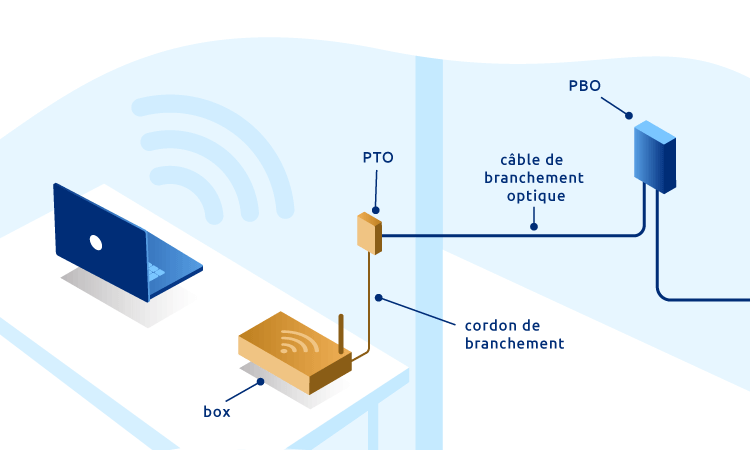
Pour comprendre le rôle de la PTO, il faut visualiser la chaîne de distribution optique depuis le central opérateur jusqu'à votre box Internet. Chaque maillon joue un rôle précis :
- NRO (Nœud de Raccordement Optique) : central opérateur où sont concentrées les fibres d'une zone géographique.
- PM (Point de Mutualisation) : armoire de rue qui dispatche les fibres entre opérateurs et immeubles.
- PBO (Point de Branchement Optique) : boîtier de palier dans les immeubles ou boîtier extérieur dans les maisons individuelles.
- PTO : votre prise murale — dernier élément passif du réseau opérateur.
- ONT (Optical Network Termination) : équipement actif (souvent intégré à la box) qui convertit le signal optique en Ethernet.
Fonctionnement : du signal optique à l'Ethernet
La PTO elle-même est un composant passif : elle ne convertit pas le signal. Son rôle se limite à fournir un point de connexion standardisé (typiquement SC/APC) entre le câble opérateur venant du PBO et la jarretière qui alimente votre ONT ou votre box fibre.
La conversion optique → électrique se fait côté ONT, qui lit le signal lumineux (laser 1310/1490/1550 nm selon les technologies GPON, XGS-PON, EPON) et le restitue sous forme de trames Ethernet utilisables par votre box et vos équipements réseau (switch, Wi-Fi, TV IP, téléphonie).
Astuce
Le câble entre la PTO et la box s'appelle une jarretière fibre optique SC/APC. Sa longueur standard est de 5, 10, 20 ou 30 mètres selon la distance. Trop tendue ou pliée à moins de 30 mm de rayon, elle peut introduire des pertes optiques visibles sur votre débit.
PTO monofibre vs multifibre : quelle différence ?
Deux architectures coexistent sur le marché français, selon le mode de déploiement choisi par l'opérateur et le type de logement :
| Critère | PTO Monofibre | PTO Multifibre |
|---|---|---|
| Nombre de fibres | 1 fibre, 1 connecteur SC/APC | 2 à 4 connecteurs SC/APC |
| Cas d'usage | FTTH résidentiel standard | Logements collectifs pré-équipés, bureaux |
| Changement d'opérateur | Intervention technicien nécessaire | Brassage possible sans intervention |
| Coût | Économique | Plus coûteux |
| Évolutivité | Limitée | Élevée — plusieurs services simultanés |
Dans la grande majorité des cas résidentiels, les opérateurs (Orange, SFR, Bouygues, Free) installent une PTO monofibre à 1 port SC/APC. Les modèles multifibres (2 ou 4 ports) sont réservés aux DTIo pré-équipés dans les constructions neuves depuis la loi ELAN, aux locaux professionnels, ou aux logements souhaitant bénéficier de plusieurs abonnements fibre simultanés.
Identifier votre PTO : le numéro de référence unique
Chaque PTO installée en France porte un numéro de référence unique (souvent appelé "numéro PTO" ou "code PTO") qui l'identifie dans la base de données de l'opérateur. Ce numéro est indispensable lors de la souscription à un abonnement fibre, du changement d'opérateur, ou pour le dépannage SAV.
Où trouver le numéro de votre PTO
- Sur le boîtier lui-même : étiquette collée à l'avant ou à l'intérieur du capot, contenant un code alphanumérique (ex :
FI-0X0X-0X0X-0X). - Sur le courrier d'éligibilité envoyé par votre opérateur après la vérification de votre adresse.
- Sur le rapport d'intervention du technicien ayant posé la PTO.
- Via l'espace client de votre opérateur (sections "mon équipement" ou "ma ligne fibre").
À retenir
Si vous emménagez dans un logement déjà équipé, relevez le numéro de PTO avant tout déménagement : il facilitera grandement l'activation de votre nouvelle ligne. Sans ce numéro, l'opérateur peut refuser d'activer l'abonnement ou facturer une intervention technicien inutile.
Installation, positionnement et remplacement
L'installation de la PTO est réalisée par un technicien fibre agréé lors du raccordement initial au réseau FTTH. Elle intervient généralement en fin de chantier de déploiement, une fois que le PBO (palier ou extérieur) est en service.
Où placer idéalement la PTO ?
- À proximité de la box Internet : la jarretière fibre est fragile, plus elle est courte, mieux c'est.
- Dans un lieu sec et protégé : éviter salle de bain, cuisine exposée aux projections ou zones de passage.
- Accessible pour la maintenance : pas derrière un meuble fixe ou dans un placard bouché.
- À 1 mètre minimum du sol : protection contre poussières, chocs et humidité résiduelle.
Quand faut-il remplacer une PTO ?
- Connecteur SC/APC endommagé (férule fendue, capot cassé, ressort détendu)
- Pertes optiques mesurées > 1 dB au connecteur (mesure OTDR ou photomètre)
- Fibre interne cassée ou pliée de façon permanente
- Déménagement de la PTO vers un autre mur (nécessite souvent une nouvelle pose)
- Passage à une architecture multifibre (upgrade vers PTO 2 ou 4 ports)
Produits Elfcam recommandés pour votre PTO
ELFCAM propose une gamme complète de PTO, câbles optiques pré-équipés et accessoires pour l'installation, le remplacement ou l'extension d'une PTO en environnement FTTH.
Produits Elfcam pour installation PTO
- PTO interface SC/APC — 1, 2 ou 4 ports (Ref 2658) — boîtier mural compatible tous opérateurs français, avec pigtails SC/APC pré-épissurés.
- FTTH Kit câble LC/APC duplex + PTO intégrée (Ref 27479) — rallonge idéale pour déplacer le boîtier fibre sans intervention opérateur.
- Câble fibre optique SC/APC avec PTO (Ref 3689) — solution tout-en-un pour extension ou remplacement.
- Câble "Pull-Eye" G.657.B3 SC/APC 50m (Ref 27261) — câble de tirage pour passage mural ou conduit, compatible Livebox, SFR Box, Bbox.
FAQ — Questions fréquentes sur la PTO
1Puis-je installer moi-même une PTO ?
En revanche, le remplacement d'une PTO existante (par exemple pour ajouter des ports) ou le déplacement sur quelques mètres via une rallonge pré-équipée est techniquement accessible à un particulier bricoleur, à condition d'utiliser les bons accessoires (câbles et PTO compatibles SC/APC).
2Ma PTO est loin de ma box, comment la rapprocher ?
- Jarretière fibre optique longue : utiliser une jarretière SC/APC de 20 à 30 m pour relier directement la PTO à votre box, sans déplacer la PTO. Solution rapide, pas cher, mais câble visible.
- Kit PTO déporté : utiliser un kit câble fibre + PTO pour créer une seconde PTO à l'endroit souhaité, avec passage de câble dans les murs ou moulures. Solution propre et durable.
3Quelle différence entre PTO et DTIo ?
4Quel type de connecteur équipe les PTO françaises ?
5Je ne trouve pas le numéro de ma PTO, que faire ?
- Contactez le service client de votre opérateur — il peut retrouver le numéro via votre adresse.
- Consultez votre courrier ou email d'éligibilité initial.
- En dernier recours, un technicien peut identifier la PTO sur place via une mesure OTDR ou une cartographie de la baie PM. Cette intervention est généralement payante hors garantie.
6Peut-on avoir plusieurs abonnements fibre sur une même PTO ?
7Ma PTO est-elle compatible avec tous les opérateurs ?
8Délai de livraison d'une PTO Elfcam ?
En résumé
La PTO (Prise Terminale Optique) est le maillon final du réseau FTTH : discret, passif, mais indispensable. Bien la connaître — son rôle, son numéro de référence, son positionnement — c'est s'épargner des interventions coûteuses lors d'un emménagement, d'un changement d'opérateur ou d'un upgrade vers le Très Haut Débit.
Pour toute question sur le choix, l'installation ou le remplacement d'une PTO, consultez notre gamme dédiée câbles fibre optique, nos adaptateurs SC/APC et nos tiroirs optiques ODF, ou contactez notre équipe technique.

















